📁 Files
The club's documents, out of people's inboxes
Minutes, the season plan, the photos from the trip. Joyn keeps them in folders next to your channels, so the next treasurer finds last year's accounts without asking around.
5 GB free, up to 2 TB on Community
Files for the whole space and for each group
Write documents together, live
📁 Files · Board
UploadMinutes
14 items
Season 2026
9 items
Volunteer handbook
Page · edited today
Budget 2026.xlsx
48 KB
Bylaws.pdf
1.2 MB
Team photo.jpg
3.4 MB
How it works
From scattered attachments to one tidy drive
01
Make your folders
Board meetings, season plans, photos. Sort them the way your community already talks about them.
02
Drop the files in
Drag files into a folder or a channel on the web, or upload from your phone.
03
Members find what they need
Everyone sees the files they have access to, on the web and in the app.
Pages
Write the minutes together, at the same time
A page is a document you write right in Joyn. Open it during the meeting and the secretary, the chair and the treasurer can all type at once, each with their own cursor.
- ✓
Headings, lists, tables and more
- ✓
Changes show up live for everyone on the page
- ✓
Pages sit in the same folders as your files
- ✓
Members can read pages in the app
📝 Volunteer handbook
Match day
Arrive 45 minutes before kick-off and check in at the clubhouse.Mia
Coffee stand
Keys are in the blue box
Cash and MobilePay both workSam
Clean the machine before you lock up
In the app
The rota is in everyone's pocket
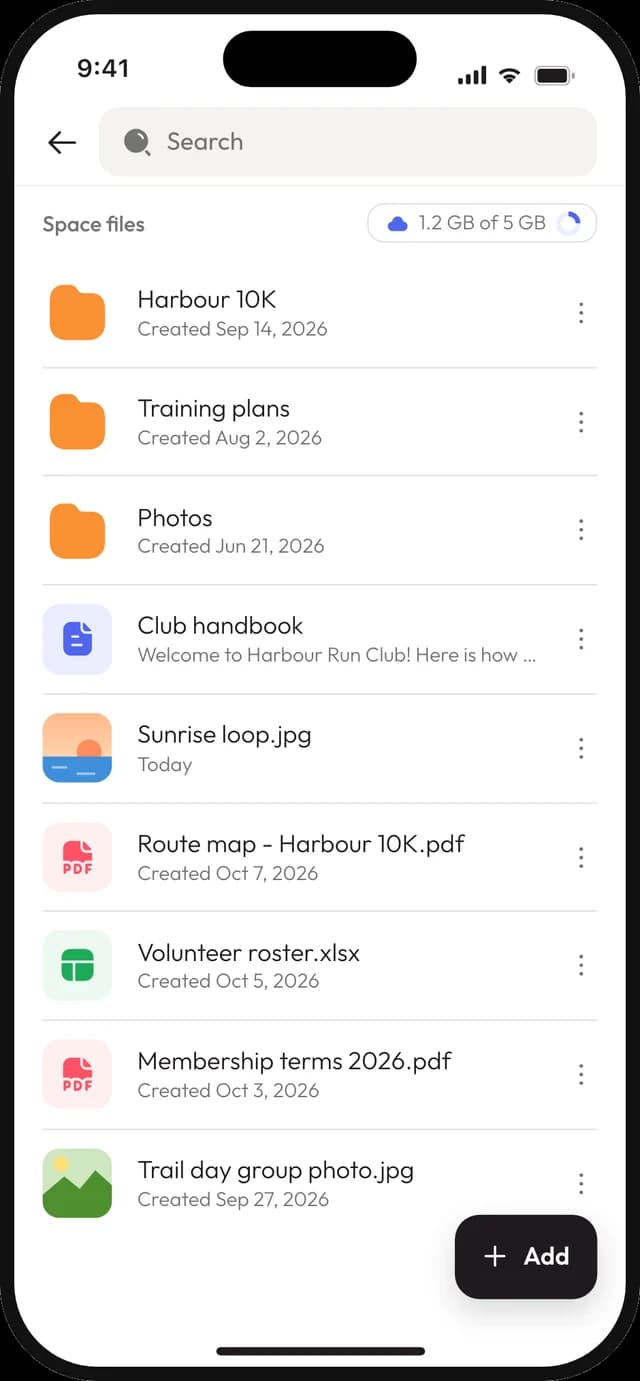
Members open the same folders in the Joyn app for iPhone and Android. Check the cleaning rota on the way to the clubhouse, or add the photos from today's match.
- ✓
Browse folders and open files
- ✓
Upload photos and documents from the phone
- ✓
Share a link straight from the app
Everything else
Built for how clubs actually keep things
A drive per group
The space has its files, and every group has its own beside them.
Roles decide who edits
Choose which roles can upload, rename, move and delete. Everyone else can still read.
Files in chat
Drop a file straight into a channel or a chat message when it belongs to the conversation.
Search by name
Type part of a file name and find it, whatever folder it's in.
Folder covers
Give a folder a cover picture, so the photo albums are easy to spot.
Storage you can see
See how much of your plan's storage is used: 5 GB on Free, 1 TB on Team, 2 TB on Community.
Who it's for
For the paperwork every community has
Boards
Minutes, statutes and accounts in one place, handed over intact when the board changes.
Clubs and teams
Training plans, match schedules and a photo folder per season, for each team's group.
Churches
Service rotas, song sheets and the small-group material, shared with the people who lead them.
Good to know
What files don't do
Joyn is a shared drive for your community, not a replacement for every cloud tool.
Pages are edited in a browser.
The app shows pages read-only. Writing and editing them happens on the web.
No version history or cloud sync.
Joyn doesn't keep old versions of a file, and it doesn't sync with Google Drive or Dropbox. Each file can be up to 20 MB.
Share links are simple.
They work for files and folders, not pages, and they have no password or expiry date. Switch them off when you're done.
Questions about files
Who can see our files?
+
Members of your space see the space's files, and each group's files belong to that group. Roles decide who can upload, rename, move and delete. Nobody outside sees anything unless you turn on a share link.
Can several people edit a document at once?
+
Yes, with pages. A page is a document written in Joyn, and everyone who opens it on the web edits the same copy live, with each person's cursor showing. In the app, pages are read-only.
How do share links work?
+
Turn on a link for a file or a folder and send it to anyone. They can view and download without an account. Switch the link off and it stops working, or reset it to make a new one. Shared files are never listed on Google.
How much storage do we get?
+
5 GB on Free, 1 TB on Team and 2 TB on Community, shared by the whole space. When it's full, uploads stop until you upgrade or delete something. Nothing is removed for you.
Can we upload from a phone?
+
Yes. The Joyn app for iPhone and Android lets members browse folders, open files, upload photos and documents and share a link.
Give your documents a home
Create your space, make a folder for the board and upload last year's minutes. The next person to ask knows where to look.
© 2026 Joyn ApS. All rights reserved.
Made with ♥ for communities