✅ Tasks
Every job has a name next to it
The committee's to-do list, the board for the summer fair and the Friday check-in, all inside the group that does the work. Volunteers see what's theirs, and nobody has to keep a spreadsheet up to date.
Assignees and due dates on every task
On the web and in the app
No separate project tool to learn
✅ Summer party
2 of 4 done
Book the hall
Done
MJOrder trophies
Done
PEPlan the food
☑ 2/4Fri
SKPrint the program
Mon
LPHow it works
From a list of jobs to jobs done
01
Add a channel to the group
Pick a to-do list, a board or a check-in. The group's members can see it straight away.
02
Write down the work
Type the tasks or paste a whole list at once. Add who's on it and when it's due.
03
Tick it off together
People get a notification when they're assigned, and the list updates live for everyone.
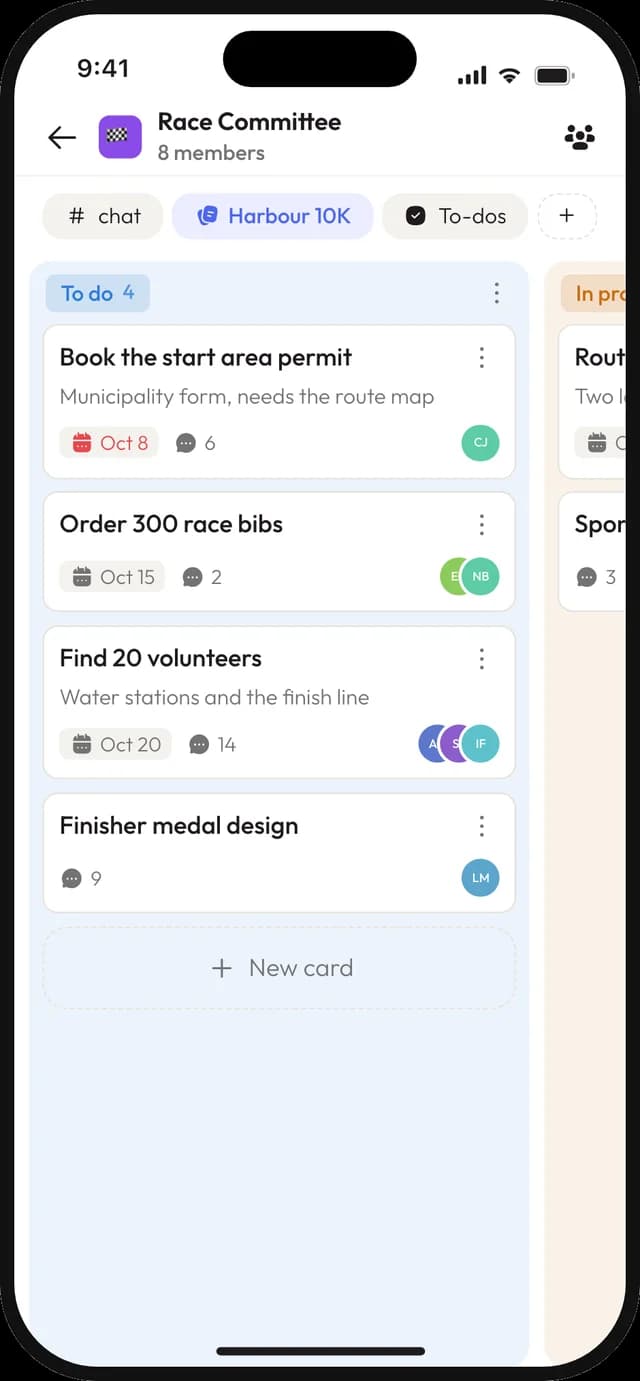
Boards
See the whole project in columns
Planning the jumble sale or the confirmation camp? Make columns like To do, Doing and Done, and move cards across as the work moves. On a phone, a card changes column from its menu.
- ✓
Cards with assignees, a due date, a note and attachments
- ✓
A conversation on every card, so the discussion stays with the job
- ✓
Move a card to another board in the same group
- ✓
Up to 20 columns per board
Check-ins
Ask the same question, on a schedule
"What did you get done this week?" or "Who can drive on Saturday?" A check-in asks the group on the schedule you set, and the answers gather in one place instead of scattered chats.
- ✓
Weekly, monthly or whatever rhythm suits the group
- ✓
An optional window, so answers close after a set time
- ✓
One answer per person, or as many as they like
- ✓
React to answers, like in the chat
🔄 What did you get done this week?
Every Friday
Mia
Sent the sponsor letters and booked the bus.
🙌 3Sam
New training plan for the juniors is up in Files.
👍 5Add your answer…
A conversation per task
The discussion stays with the job
Every to-do and every card opens into its own page, with the note on one side and a conversation on the other. Questions about the hall booking stay on the hall booking, not buried in the group chat.
- ✓
Replies and reactions, like in a channel
- ✓
Join in from the app or the browser
- ✓
The list shows how many messages each task has
# first-team
Coach Anna · 09:12
Bring both kits on Saturday, it might rain ☔
3 replies
Jonas @Anna what time do we meet?
Anna 08:30 at the clubhouse 🚌
Everything else
Small things that keep work moving
Sub-tasks
Break a task into steps. The list shows how many are done, like 3 of 5.
Several assignees
Put two or three people on the same job, so it doesn't rest on one pair of shoulders.
Due dates
Give a task a day it needs to be done by. Your tasks sorts by it.
Your tasks
On the web, one list of every to-do and card on your name, across groups and spaces, by due date.
Attachments
Add the quote, the floor plan or the photo to the task it belongs to.
Paste a whole list
Paste the minutes' action points and each line becomes its own task.
Assignment notifications
People hear about it when a task or card is put on their name.
In the Monday email
The weekly email lists the tasks due that week, next to the events.
Created by integrations
On paid plans, a form or another tool can add to-dos through the public API.
Who it's for
For everyone who pitches in
Boards and committees
Action points from the meeting, with a name and a date, followed up before the next one.
Event crews
A board for the summer fair or the tournament, from booking the hall to returning the keys.
Volunteer teams
The cleaning rota, the kit list and a weekly check-in on who can help.
Good to know
Where tasks stop
Joyn is built for volunteers, not project managers. Here's what that means.
Tasks live in groups.
To-do lists, boards and check-ins are channels inside a group. Free includes 2 groups and 3 channels, so bigger setups need Team or Community.
No project-tool extras.
There are no repeating to-dos, dependencies, Gantt charts or time tracking. Sub-tasks go one level deep.
Your tasks is on the web.
In the app, you find your tasks in their channels and in the Monday email.
Questions about tasks
What's the difference between a to-do list and a board?
+
A to-do list is a simple list you tick off, with sub-tasks and a progress count. A board puts cards in columns you choose, which suits work that goes through stages. Both have assignees, due dates, attachments and a conversation per item.
Can volunteers use it on their phone?
+
Yes. To-dos, boards and check-ins all work in the Joyn app for iPhone and Android, including sub-tasks, moving cards and the conversation on each task.
How does a check-in work?
+
You write a question and choose how often it comes back, for example every Friday. Each time, the group gets a notification and answers in the channel. You can close answers after a set time and choose whether people can answer more than once.
Do people get reminded about their tasks?
+
They get a notification when a task is assigned to them, and the weekly Monday email lists their tasks due that week, with a link straight to each one.
Is there a limit on tasks?
+
No. A to-do list or board can hold as many tasks as you need. Each task can have up to 20 assignees, and a board up to 20 columns.
Turn the meeting notes into tasks that get done
Create your space, add a group for the committee and paste in the action points. Everyone knows what's theirs before they get home.
© 2026 Joyn ApS. All rights reserved.
Made with ♥ for communities