🏠 Groups
Every team gets its own room, under one roof
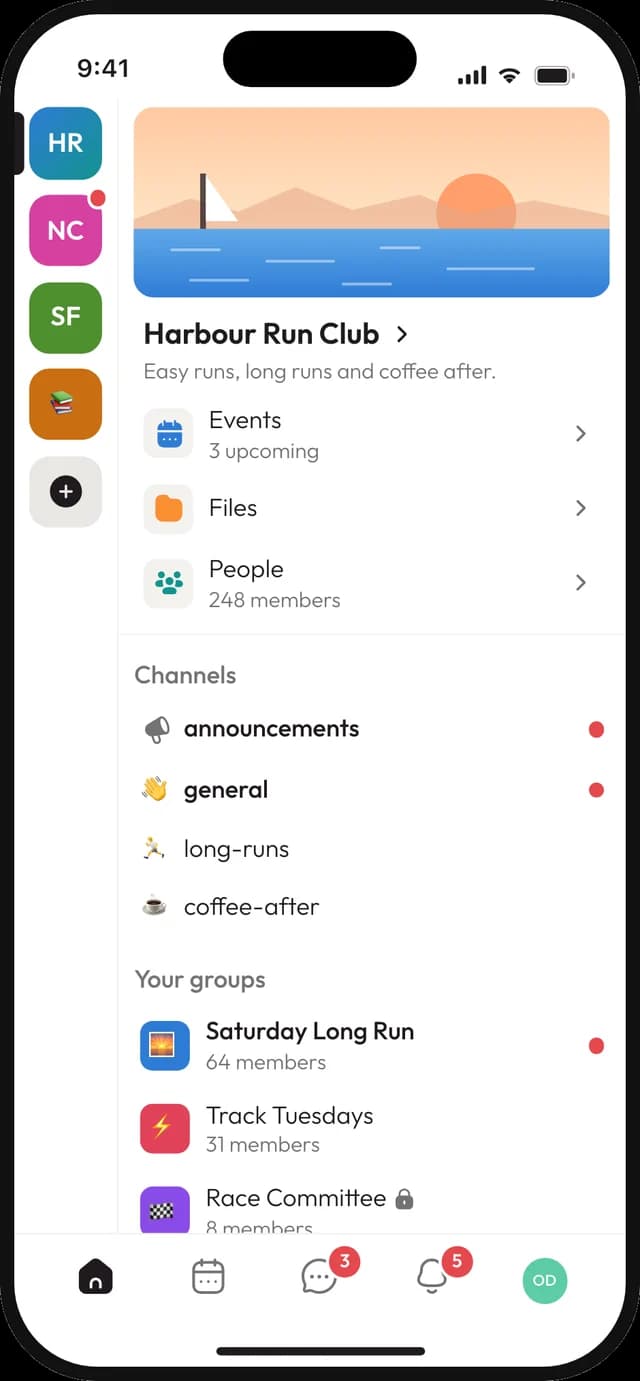
Your community is one space. Inside it, the under-12s, the board, the choir and the summer camp crew each get a group with their own conversation, plans and files, so nobody wades through what isn't theirs.
Public or private groups
Its own admins and permissions
Channels, events, to-dos and files inside
How it works
From one big community to clear corners
01
Create a group
Name it after the team, committee or interest, and pick whether it's public or private.
02
Add the people
Add members yourself, or let people in the community join a public group on their own.
03
Hand over the keys
Make the team leader or committee chair an admin. They run the group, you keep the overview.
Inside a group
Everything the team needs, nothing it doesn't
A group is more than a chat. It has its own channels for talk and news, its own events, a shared to-do list or board for the work, and a folder of files that stays with the group.
- ✓
Chat and announcement channels
- ✓
To-do lists, boards and recurring check-ins
- ✓
Events that invite just this group
- ✓
Files and pages shared with the members only
✅ Summer party
2 of 4 done
Book the hall
Done
MJOrder trophies
Done
PEPlan the food
☑ 2/4Fri
SKPrint the program
Mon
LPPublic or private
Open for anyone, or just the few
A public group shows up for everyone in the community, and people can join with one tap. A private group stays hidden from people who aren't in it, so the board or the pastoral team can talk freely.
- ✓
Public groups anyone in the community can join
- ✓
Private groups that only members can see
- ✓
A role that lets the board see which private groups exist, without reading them
Odense Rowing Club
Space · 214 members
Juniors
48 members · 4 channels
Masters
31 members · 3 channels
Regatta crew
12 members · 2 channels
Board
7 members · 3 channels
Admins and permissions
Let each group run itself
Every group has its own admins, and you can have several. They decide what ordinary members are allowed to do there, without touching the rest of the community.
- ✓
More than one admin per group
- ✓
Switches for adding people, managing channels and files, and renaming the group
- ✓
Only admins can promote other admins or delete the group
- ✓
If the last admin leaves, a member is made admin so the group is never left without one
Roles · Treasurer
Manage subscription
Manage files
Create invitations
Create events
Manage roles
2 members have this role
Everything else
Details for growing communities
Group events
Plan the away match for the team, not the whole club. Only the group is invited and reminded.
Shared to-dos
Who books the hall, who orders the shirts. Assignees, due dates and a list everyone can tick off.
Boards
Move cards between columns for bigger projects, like the summer fête or the website redo.
Check-ins
A question that comes back every week, like "Who's in on Saturday?", answered in one place.
Group files
Training plans, minutes and photos kept in the group's own folder, visible to its members.
Community-wide overview
Give a role the right to manage every group, so the board can help out anywhere it's needed.
Who it's for
One community, many groups
Clubs
A group per team and age group, plus one for the coaches and one for the parents' committee.
Churches
Small groups, the worship team, the youth club and a private group for the church council.
Associations
The board, the festival committee and interest groups for gardening, games or running.
Good to know
What groups don't do
So you can plan your structure with the right picture.
Groups are one level deep.
You can have many groups in a community, but not groups inside a group. Name them clearly, like "U12 - Girls", to keep them sorted.
Private groups are invite only.
People can't ask to join a private group. A group member with the right permission adds them.
Free includes 2 groups.
Team and Community allow up to 200 groups.
Questions about groups
What's the difference between the community and a group?
+
The community, your space, is everyone: the whole club, church or association. Groups are smaller circles inside it, like a team or a committee, each with their own channels, events, to-dos and files.
Who can create groups?
+
People whose role allows managing groups, usually the owner and the board. You decide which roles get that permission.
Can the board see what happens in private groups?
+
Only if they are members, or their role can manage groups. There's also a separate permission that only shows which private groups exist, without access to what's inside.
Can a member be in several groups?
+
Yes, as many as they like. A coach can be in their team, the coaches' group and the board, and see everything in one app.
Do group members get notified about everything in the community?
+
No. Group channels and group events only notify the people in that group, so the choir doesn't hear about the football team's kit order.
Is it free?
+
Yes, for up to 100 members with 2 groups and 3 channels. Team (€4 per person a month) and Community (€250 a month, unlimited members) allow up to 200 groups. Prices include VAT.
Give every team its own space
Create your community, add a group for each team or committee, and make someone else the admin. You'll stop being the bottleneck by next week.
© 2026 Joyn ApS. All rights reserved.
Made with ♥ for communities